



Panels display the picture, but they do not decide anything. How many sources appear at once, how they are arranged across the screens and whether a layout can be switched in a second — all of that is set by the video wall controller. It is the part people economise on first and rebuild the system over later.
The typical mistake looks like this. The customer counts panels, agrees the canvas size and takes whichever controller comes with it. A month later it turns out there are three inputs and five sources, and the operator is swapping cables by hand mid-meeting.
Below: what a controller actually does, how the three Elpix video wall models differ, and how to size the configuration before ordering rather than after.
What a video wall controller does
The controller sits between the signal sources and the panels. It takes HDMI or DisplayPort from computers, cameras, recorders and mapping systems, then handles three jobs.
- Arranges the image across screens. A single source can stretch over the whole canvas or occupy one panel.
- Scales and synchronises. A 4K input becomes Full HD on each panel with no tearing between them.
- Switches scenarios. Saved presets change the entire layout with one command instead of dragging windows by hand.
What a controller does not do: it cannot add pixels that were never there. A 1280×720 source will look soft on a 6×2 canvas no matter how much the processor cost.
What follows from this: choose the controller by source count and operating mode, not by panel count. Panels only set the minimum number of outputs.
Three Elpix controllers and what they are for
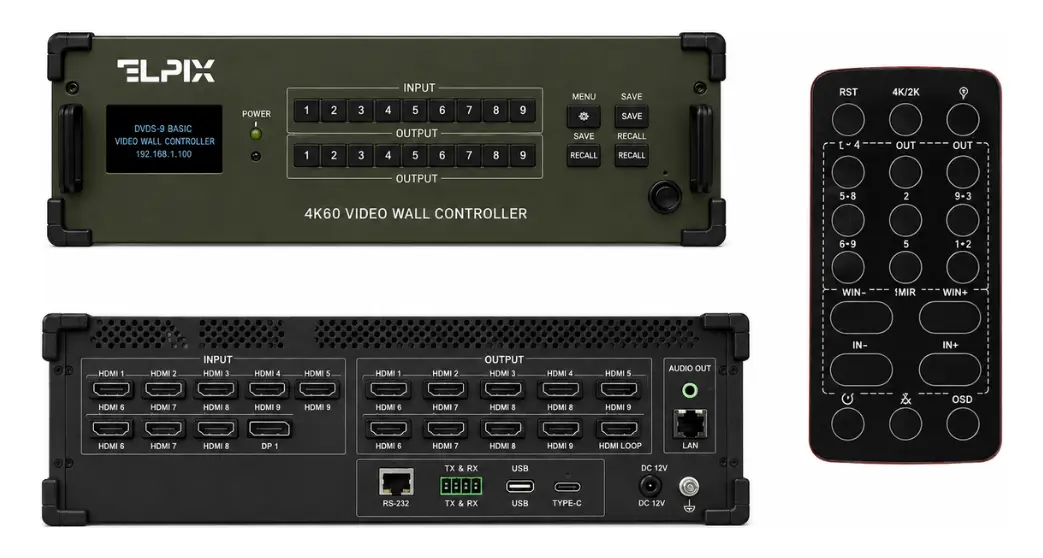
Elpix VW-5×9 — the base video wall processor
Built for canvases of up to nine screens. In ready-made kits it ships with the 2×2, 3×2 and 4×2 configurations.
- Inputs: five — four HDMI and one DisplayPort
- Outputs: 9 × HDMI, so up to nine displays
- Resolution: input up to 4K Ultra HD 3840×2160 at 60 Hz, output Full HD 60 Hz per panel
- Default layout: 3×3, with other configurations supported
- Modes: single canvas and multi-zone display
- Control: front panel, IR remote, RS232, web GUI over LAN
- Chassis: 440 × 200 × 60 mm, reinforced corners, carrying handles
Five inputs cover most small-headquarters scenarios: operator PC, camera, map and one source in reserve.
Elpix VM-12×12 — matrix switcher and processor
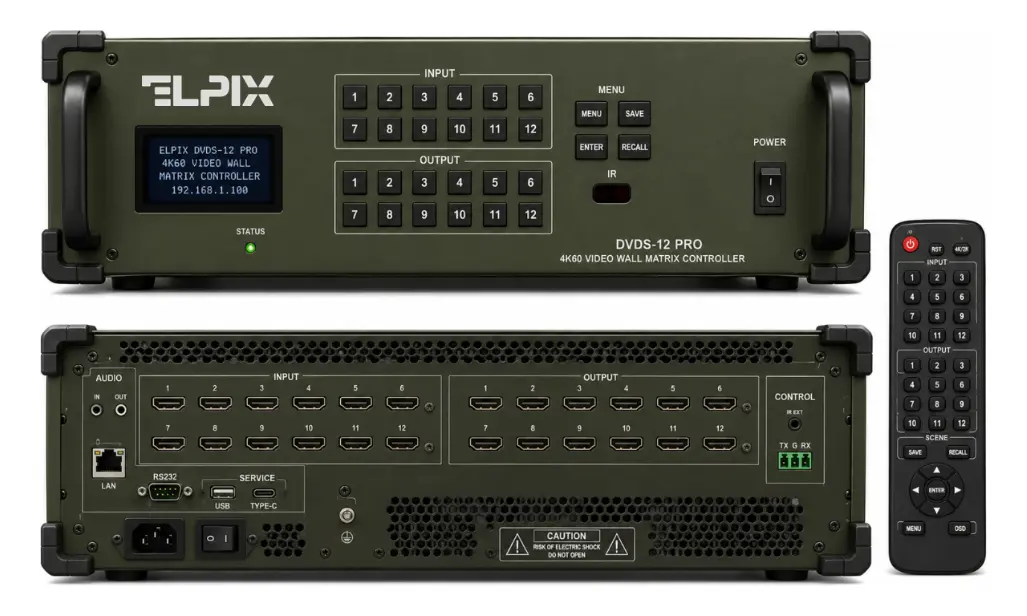
A different class of device. The VM-12×12 combines three functions at once: matrix switcher, video wall processor and multi-window processor.
- Inputs and outputs: 12 × HDMI in, 12 × HDMI out
- Resolution: up to 4K UHD 3840×2160 at 60 Hz, HDCP supported
- Modes: Video Wall, Matrix Switching, Multi-Zone, Multi-Picture
- Canvas configurations: 2×2, 3×3, 4×3, 2×6 and others
- Processing: EDID management, scaling, seamless switching, saved scenarios
- Control: front panel, IR remote, RS232, web GUI over LAN
- Power: 100–240 V AC; powder-coated metal chassis with transport handles and reinforced corners
- Optional: signal over Cat6/Cat6A via HDMI-over-Cat6 or HDBaseT
Matrix mode is the key difference. Any of the twelve sources can go to any of the twelve outputs, not merely be tiled across the canvas. For a control room where every operator has a monitor plus a shared wall, that function decides the purchase.
Elpix ME-16×2 — multi-window processor for two screens
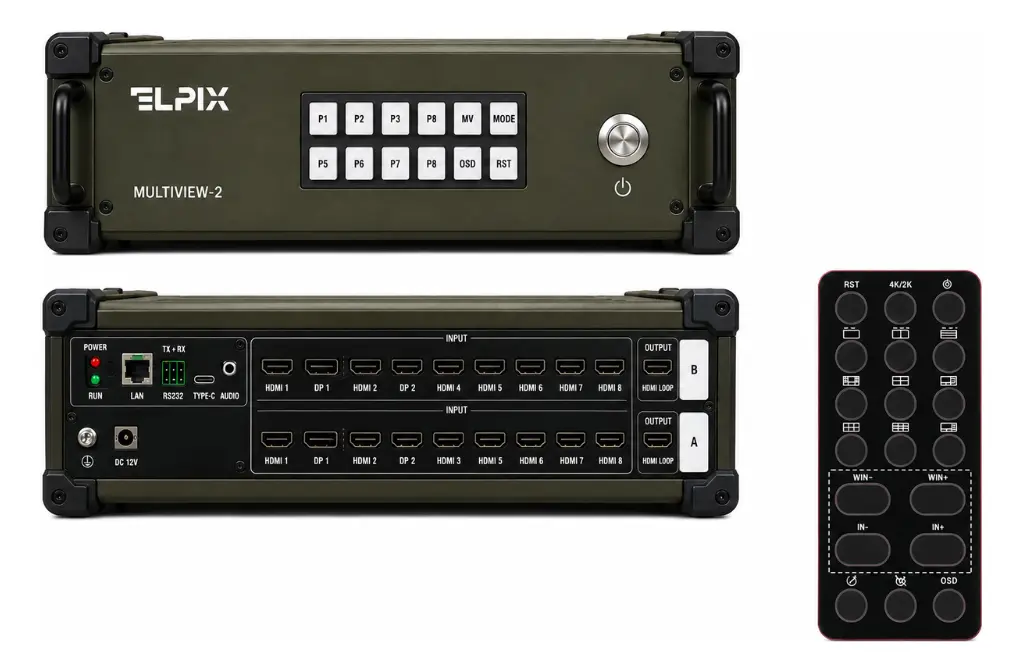
The narrowest specialisation and the most interesting scenario. The unit accepts up to sixteen sources and lays them out across two displays as a grid of windows.
- Inputs: up to 16 sources (HDMI and DisplayPort)
- Outputs: 2 × HDMI 2.0
- Resolution: 4K Ultra HD 3840×2160 at 60 Hz
- Layouts: 4 / 8 / 9 / 10 / 13 / 16 windows
- Switching: seamless, with saved scenarios
- Interfaces: LAN, RS232, USB/Type-C service port, audio out, DC 12V, grounding
- Chassis: rugged metal, military-grade, reinforced corners, side handles, olive green
- Dimensions: 440 × 200 × 60 mm; the kit includes the unit, remote, power supply, cables and manual
Sixteen windows across two screens is a monitoring scenario: UAV feeds, surveillance cameras, recorders, laptops and mapping systems in one field of view. DC 12V power means the system can run from an autonomous supply.
What follows from this: three devices solve three different problems. The VW-5×9 builds a canvas, the VM-12×12 routes streams between sources and screens, the ME-16×2 gathers many feeds into one view.
Table: which controller for which system
| Parameter | VW-5×9 | VM-12×12 | ME-16×2 |
|---|---|---|---|
| Sources in | 5 (4 HDMI + 1 DP) | 12 × HDMI | up to 16 |
| Screens out | up to 9 | 12 | 2 |
| Resolution | 4K60 in, Full HD 60 out | up to 4K UHD 60 Hz, HDCP | 4K UHD 60 Hz |
| Modes | video wall, multi-zone | Video Wall, Matrix, Multi-Zone, Multi-Picture | 4/8/9/10/13/16 windows |
| Ready configurations | 3×3 default | 2×2, 3×3, 4×3, 2×6 and others | window grid on 2 screens |
| Power | supply included | 100–240 V AC | DC 12V |
| Typical system | 2×2 to 4×2 video wall | control room with stream routing | mobile monitoring, field module |
All three are operated the same way: front panel, IR remote, RS232 and a web interface. That helps when an organisation runs several systems — operators do not have to learn different interfaces.
How many inputs you actually need
The arithmetic is simple, yet almost nobody does it before ordering. Write down everything that has to appear on the canvas during a working day.
- Permanent sources. The operator workstation, the CCTV system, a mapping service — whatever stays on screen all the time.
- Occasional ones. A presenter’s laptop, a video call, an analytics dashboard — they turn up during meetings.
- Spare capacity. At least one free input. It gets used sooner than expected, usually by a contractor arriving with their own laptop.
The sum of the three groups is the input count you need. If it comes to six, the five-input VW-5×9 is already out — look at the VM-12×12 or plan a switcher ahead of the controller.
What follows from this: inputs always run out before outputs. A canvas rarely grows after installation, while sources keep being added.
Layouts: from 3×3 to sixteen windows
The layout is how the controller divides the canvas between sources. Three standard modes cover almost every need.
Single canvas. One image stretched across every screen — right for a map, a schematic or video for a whole hall. The source needs the resolution to match: 4K at the input distributes across panels without losing sharpness.
A grid of equal windows. A classic 3×3 video wall shows nine feeds at the same size. A 4×4 wall of sixteen panels is the practical ceiling for most systems. The VM-12×12 supports 2×2, 3×3, 4×3, 2×6 and more; the ME-16×2 builds 4, 8, 9, 10, 13 or 16 windows across two screens.
Multi-zone display. One large window plus several small ones alongside. The main source takes most of the canvas while secondary feeds run in a strip. For meetings this is the most usable mode: presenter in the centre, metrics along the edge.
Seamless switching deserves a separate mention. When an operator changes source, cheap devices blank the screen for a second or two. Elpix models switch seamlessly, and during a meeting the difference is obvious.
Control: what gets used in practice
Four control interfaces look excessive until you see when each one earns its place.
- Web GUI over LAN — the everyday tool. The operator opens a browser, drags windows around and saves scenarios.
- IR remote — for switching presets during an event, when opening a laptop is not an option.
- RS232 — for integration with room automation, linking the controller to a button panel or scene controller.
- Front panel — the fallback. It works when the network is down and something has to go on screen now.
Saved scenarios are underrated during selection and valued most in daily use. Three or four presets — “meeting”, “monitoring”, “presentation” — remove a chunk of manual work.
What follows from this: ask about the web GUI and presets before buying. A device without a decent web interface turns every layout change into a service call.
Between source and panel: the chain in plain terms
The chain is simpler than it looks, and each link adds its own limits.
- The source. PC, camera, recorder, laptop. It outputs at its own resolution, and the canvas cannot exceed it.
- Cable to the controller. HDMI or DisplayPort. Beyond 10 metres you need quality cable or twisted-pair transmission.
- The controller. Receives, scales, arranges and switches. Scenarios live here too.
- Cables to the panels. One HDMI per screen — twelve cables for a 6×2 canvas.
- The panels. Each shows its share of the whole image.
The weak link is almost always one of two: a low-resolution source or a cheap long cable. The controller is the most reliable part of this chain, provided it was sized correctly.
What to check at handover
When installers hand the system over, ten minutes on the controller is time well spent.
- Connect every source to its own input and confirm the controller sees it.
- Run through all saved scenarios from the remote and from the web interface.
- Switch sources while video is playing and check there is no black frame in between.
- Put one image across the whole canvas and look at the joints: text must not break.
- Ask where the settings are stored and how to restore them if the unit is replaced.
Five mistakes when choosing a controller
- Counting outputs instead of inputs. Nine outputs mean nothing when there are six sources and five inputs.
- Ignoring EDID. Without EDID management some sources negotiate the wrong resolution and deliver an image with black bars. The VM-12×12 handles this in hardware.
- Skipping HDCP. Protected content from a media player simply will not appear if the chain does not support HDCP.
- Buying long cheap HDMI. Past 10 metres you need quality cable or Cat6 transmission — the VM-12×12 offers HDBaseT for exactly that.
- Forgetting power. The ME-16×2 runs on DC 12V and suits autonomous systems; the VM-12×12 needs 100–240 V mains. For a field module that difference is decisive.
Elpix equipment
Elpix video wall controllers
VW-5×9 controller
Five inputs and nine HDMI outputs, 4K60 in, 3×3 default layout, web GUI and RS232 control.
View model
VM-12×12 video matrix
Twelve in, twelve out, Video Wall, Matrix and Multi-Zone modes, EDID and HDCP, HDBaseT option.
View model
ME-16×2 multiscreen
Up to 16 sources on two screens, layouts up to 16 windows, DC 12V, military-grade enclosure.
View model
Elpix video wall controllers: designed in-house
Elpix designs its controllers for its own video walls, so kits never suffer from mismatches between processor and panels. That removes the usual problem of assembled systems bought from three different suppliers.
- Matched to the configuration. The 2×2, 3×2 and 4×2 canvases ship with the VW-5×9; 5×2 and 6×2 come with the VM-12×12.
- Hardened build. Rugged metal chassis with reinforced corners and handles, and a military-grade enclosure on the ME-16×2.
- One approach to control. Web GUI, RS232, IR remote and front panel across every model.
- Service in Ukraine. Maintenance and module replacement do not wait on imports.
Specifications, kit contents and current prices are in the catalogue — Elpix video walls. To size a controller, a list of sources and the number of screens is enough.